

Description
Custom New Tab Page with Daily Wallpapers
Overview
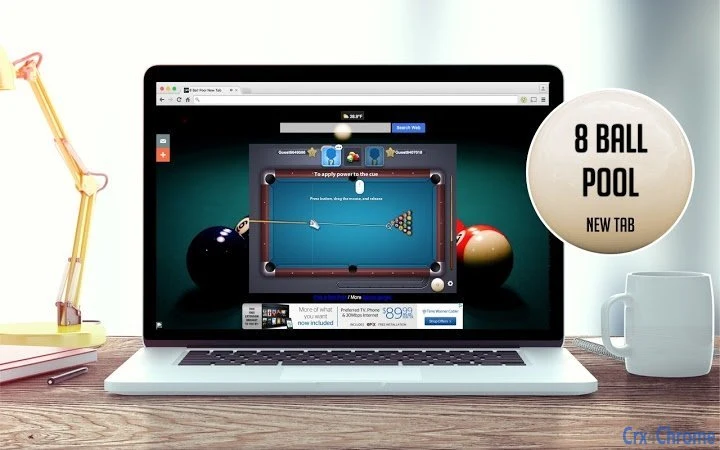
The software provides a customizable New Tab page designed to enhance browsing efficiency and personalization. It replaces the default browser New Tab page with a dynamic interface that integrates essential tools such as weather, time, date, calendar, notes, and direct access to major social media platforms like Facebook, Twitter, Instagram, and YouTube. Users can also perform web searches directly from the page, making it a centralized hub for daily digital activities. The interface features a rotating gallery of high-definition images, including themes related to billiards, pool tables, and free pool games, offering visual variety and aesthetic appeal.
Designed for consumers and casual users seeking a more engaging and functional browsing experience, this tool aims to reduce time spent switching between tabs and applications. It is particularly suited for individuals who frequently use their browsers for social media, task management, and quick information retrieval. The developer, BrandThunder, positions the software as a modern alternative to standard browser defaults, emphasizing daily visual refreshes and user customization. While the product is not a Chrome theme, it functions as a standalone desktop application that integrates with major browsers, including Chrome, Firefox, and Edge.
Key Features & Capabilities
- Daily Rotating Wallpapers – A gallery of over 300 high-definition images is available, with new backgrounds rotating daily. Themes include billiards, pool tables, and free pool games, offering visual variety and aesthetic appeal.
- Integrated Tools – The interface includes real-time weather, current time, date, calendar, and notes, allowing users to manage daily tasks and stay informed without opening additional apps.
- Social Media Access – Direct shortcuts to Facebook, Twitter, Instagram, and YouTube enable quick access to social platforms, streamlining content consumption and interaction.
- Web Search Integration – A built-in search bar allows users to perform web searches directly from the New Tab page, reducing the need to open a new tab or navigate to a search engine.
- Customization Options – Users can personalize the layout, choose preferred features, and vote on favorite images, tailoring the experience to individual preferences.
- Performance Enhancements – Version 2.1.8 includes significant speed improvements, faster loading times, and optimized UI/UX, making the New Tab page more responsive.
These features collectively reduce browser clutter and improve workflow efficiency. For example, a user can check the weather, view their calendar, and post to Instagram—all from a single, unified interface. The customization options allow users to prioritize tools based on their daily routines, enhancing usability and personal satisfaction.
User Interface, Workflow & Performance
The user interface is clean and intuitive, featuring a grid-based layout with clearly labeled sections for each tool. Navigation is straightforward, with icons and text labels guiding users through available functions. The design emphasizes visual clarity and quick access, minimizing cognitive load. The daily wallpaper rotation adds a dynamic element that keeps the interface fresh and engaging.
Workflow efficiency is enhanced by the integration of multiple utilities into a single screen. Users can access essential functions without switching between tabs or applications, reducing context switching. The updated version improves loading speed, contributing to a smoother experience. However, exact performance details such as CPU or RAM usage were not specified by the developer.
Stability appears to be a focus in recent updates, with bug fixes and UI/UX improvements included in version 2.1.2 and 2.1.8. The developer has emphasized security enhancements, suggesting that data handling and user privacy are considered in the design. General software behavior patterns indicate consistent performance, though real-world testing was not provided.
Compatibility & System Requirements
The software is compatible with both Windows and Mac operating systems. It is designed to work with major web browsers, including Chrome, Firefox, and Edge. The installation size is 3.5 MB, indicating a lightweight footprint that should not significantly impact system resources.
Exact system requirements were not listed by the developer. Platform compatibility information is limited to the supported OS and browser types. The software does not require high-end hardware, as the file size suggests a minimal resource demand. However, specific CPU, RAM, or storage thresholds were not provided.
Pros and Cons
Pros
- Lightweight installation at only 3.5 MB
- Fast loading times and performance improvements in latest version
- Extensive gallery of over 300 HD wallpapers with daily rotation
- Integrated tools for weather, time, date, calendar, and notes
- Direct access to major social media platforms and web search
- High level of customization and user control
Cons
- Developer did not provide detailed system requirements
- Exact resource usage (CPU/RAM) was not specified
- Functionality limited to browser integration; not a standalone desktop app beyond the New Tab page
- Some users may find the daily wallpaper rotation distracting
- Customization options may be overwhelming for less tech-savvy users
FAQ Section
Is this software compatible with my browser?
The software is designed to work with major browsers including Chrome, Firefox, and Edge. Compatibility with Windows and Mac operating systems is confirmed.
Is the software secure to use?
The developer has implemented security enhancements in recent updates. Users are advised to download only from official sources and avoid third-party distribution channels.
How often does the wallpaper change?
The wallpaper rotates daily, offering a new high-definition image each day from a gallery of over 300 options.
Can I update the software automatically?
Automatic update functionality is not specified. Users should check for updates manually or rely on browser extension update systems.
Is this a free tool?
Yes, the software is available at no cost. It is categorized as a free utility tool for desktop users.
Final Thoughts
This customizable New Tab page delivers a modern, efficient, and visually engaging browsing experience. With a focus on integration, performance, and personalization, it stands out among similar tools. The daily wallpaper rotation, combined with essential utilities and social media access, makes it ideal for users who value both functionality and aesthetics. While detailed system requirements are not provided, the lightweight nature and cross-platform support suggest broad accessibility.
For individuals seeking a streamlined, personalized browser start page, this software offers a compelling solution. Its continuous improvements, including speed optimizations and enhanced security, reflect a commitment to user satisfaction. The ability to tailor the interface to individual preferences adds long-term value.
Download BrandThunder's New Tab Page now and transform your browsing experience with a dynamic, feature-rich start screen.
Guides & Tutorials for 8 Ball Pool New Tab Extension for Chrome
How to install 8 Ball Pool New Tab Extension for Chrome
- Click the Preview / Download button above.
- Once redirected, accept the terms and click Install.
- Wait for the 8 Ball Pool New Tab Extension for Chrome download to finish on your device.
How to use 8 Ball Pool New Tab Extension for Chrome
This software is primarily used for its core features described above. Open the app after installation to explore its capabilities.
User Reviews for 8 Ball Pool New Tab Extension for Chrome 0
No reviews found





